Guides
How to Enable Biometric Login on TPWallet (TokenPocket) for Extra Security
Updated 2026-10-21T02:20:18.412+00:00
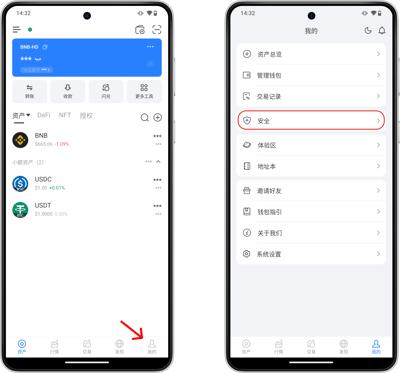
Biometric login (Face ID / Fingerprint) adds a fast, convenient security layer for TPWallet. Your biometric data stays locally on your device and will not be uploaded to servers. A wallet password is still required as a backup.
Prerequisites
- Your phone has Face ID (iOS) or fingerprint sensor (Android), and biometrics are already set up in your system settings.
- You have set a valid wallet password inside TPWallet.
- Update TPWallet to the latest official version.
- Biometric unlock is only available on the mobile app; Chrome extension and desktop versions do not support this feature.
Step-by-step Guide
- Open TPWallet and tap Me at the bottom right corner.
- Select Security from the menu list.
- Tap Wallet Password.
- Find the toggle option for Biometric / Password-free Payment & Unlock.
- Switch the toggle on, then enter your wallet password to confirm.
- Complete Face ID or fingerprint verification when the system pops up.
- Done. Next time you open TPWallet or confirm transactions, you can unlock with biometrics directly.
Important Security Notes
- Biometrics is a convenience method, not a replacement for your wallet password and seed phrase. Always back up your 12/24-word seed phrase offline.
- If biometric authentication fails too many times, TPWallet will fall back to wallet password unlock.
- If you disable or reset your phone’s system biometrics, TPWallet biometric access will be turned off automatically.
- Do not enable biometric login on shared or rooted/jailbroken devices.
- If you sell or reset your phone, remove the wallet first and disable biometric permissions.
Troubleshooting
- No biometric option shown: Confirm your device supports biometrics, update TPWallet, and re-enable fingerprint/Face ID in phone system settings.
- Biometrics keeps failing: Clean the fingerprint sensor, re-record your face/fingerprint in system settings, and restart TPWallet.
- Permission denied: Go to your phone App permissions, grant TokenPocket access to biometric authentication.